
之前博客其实是以Varnish=>Nginx=>PHP(FPM-FCGI)来访问的,但Varnish不支持SSL,也就是说无法使用https。
所以耍点小聪明,以Nginx(443)=>Varnish(80)=>Nginx=>PHP(FPM-FCGI)来访问到博客。也就是说https走Nginx,反代回Varnish,Varnish反代后端Nginx反代PHP。
画了张简单的示意图:
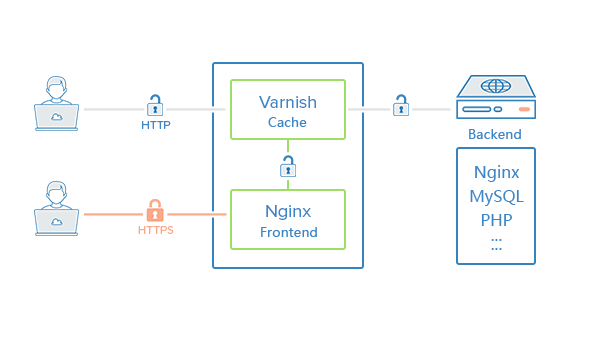
如上,就很好解决了这个问题,虽说目前Nginx只支持h2、http/1.1,但算是够用了。什么时候也能同时支持h2、h2-15、h2-14、spdy/3.1、spdy/3、http/1.1就爽了,当然,这只是YY一下。
言归正传,编译Nginx相信大家都会了,使用 --with-http_v2_module 便可使用上http2。
在原有的Varnish+Nginx架构中,给Nginx添上规则:
server {
        listen 443;
        server_name gaojie.me;
        ssl on;
        ssl_certificate /usr/local/nginx/conf/ssl/ssl.crt;
        ssl_certificate_key /usr/local/nginx/conf/ssl/ssl.key;
        ssl_session_timeout 5m;
        ssl_protocols SSLv2 SSLv3 TLSv1;
        ssl_ciphers ALL:!ADH:!EXPORT56:RC4+RSA:+HIGH:+MEDIUM:+LOW:+SSLv2:+EXP;
        ssl_prefer_server_ciphers on;

        location / {
            proxy_pass http://127.0.0.1:80;
            proxy_set_header X-Real-IP  $remote_addr;
            proxy_set_header X-Forwarded-For $proxy_add_x_forwarded_for;
            proxy_set_header Host $host;
            proxy_set_header X-SSL on;
            proxy_hide_header Vary;
            proxy_redirect off;
        }
}
这样https就被Nginx监听了,并且对处于http(80端口)的Varnish进行反代。其中kn007_net_security.conf里是诸如ssl_certificate一类ssl信息的配置,请大家自行替换为所需。
给Varnish添上规则:
sub vcl_recv {

	...

    if (req.http.X-SSL == "on") {
      set req.http.X-Forwarded-Proto = "https";
      set req.http.X-Forwarded-Port = "443";
    }

	...

}
这样就达到http访问Varnish,https访问Nginx。当然如果你想设定,http走Varnish时,跳转到Nginx的https,只要将上面Varnish配置,略微修改一下,大概如下:
sub vcl_recv {

	...

    if ( req.http.X-Forwarded-Proto !~ "(?i)https" && !req.http.X-SSL){
      set req.http.x-redir = "https://" + req.http.host + req.url;
      return(synth(700, ""));
    }

    if (req.http.X-SSL == "on") {
      set req.http.X-Forwarded-Proto = "https";
      set req.http.X-Forwarded-Port = "443";
    }

	...

}

	...

sub vcl_synth {

	...

    if (resp.status == 700) {
      set resp.status = 301;
      set resp.http.Location = req.http.x-redir;
      return (deliver);
    }

	...

}
现在Varnish对普通访客访问80端口的行为,跳转到443,对Nginx(443端口)的访问进行放行。
转自:kn007的个人博客的《利用Nginx实现Varnish支持SSL访问》
本文链接:https://jeff.xin/post/47.html
--EOF--
Comments
发表评论:
◎欢迎参与讨论,请在这里发表您的看法、交流您的观点。